Product Photography Hacks With AI
Create polished product photos without a studio. Learn practical setup, lighting, AI editing, prompt, accuracy, and export tips.
Turn this inspiration into your own images.
Bring a brief or a reference image. Explore the possibilities with four AI models.
Free credits to start · No credit card

Product photography hacks combine a simple camera setup with AI editing and scene generation to create polished ecommerce images without a full studio. The best workflow keeps the real product accurate, then uses AI for backgrounds, lighting, resizing, and lifestyle variations. Here is how to build that repeatable process, and if you are new to the technology, this guide to how AI photo editing actually works provides useful context.
AI product photography in short
- A smartphone, stable support, clean background, and soft light provide a reliable source image for AI editing.
- Amazon accepts images from 500 to 10,000 pixels on the longest side and recommends at least 1,000 pixels.
- Amazon main images should show the product occupying about 85% of the image area.
- A complete product set should combine a clean main image with detail, scale, packaging, and lifestyle views.
- Exact labels, logos, colors, dimensions, and included accessories must remain faithful to the real product.
- AvocAIdo runs each generation across 4 current AI models used for image generation, giving the user 4 interpretations to review. (zdroj: AvocAIdo)
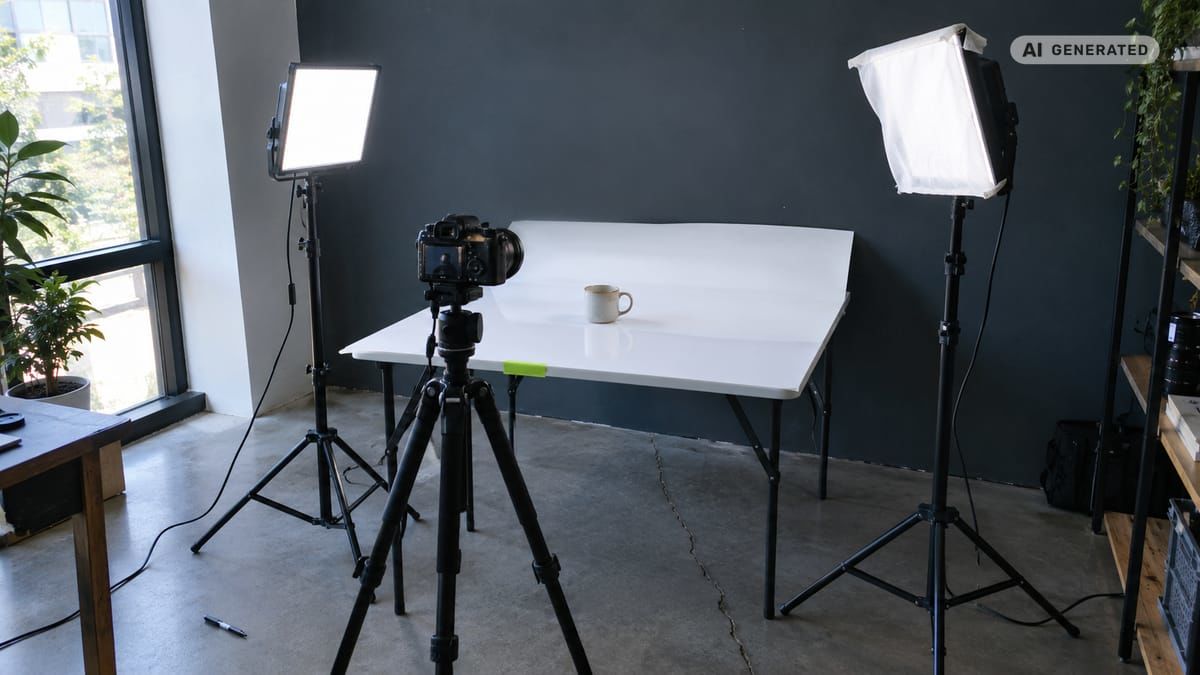
Product image workflow checklist
- Clean the product and camera lens before shooting.
- Place the camera on stable support.
- Use a plain background with visible separation from the product.
- Soften direct light with diffusion or reflected light.
- Lock focus and exposure before capturing each angle.
- Photograph the front, back, side, packaging, and important details.
- Keep one unedited reference image open during AI editing.
- Inspect every logo, label, edge, reflection, and color.
- Export each image for its intended marketplace or social format.
- Test the main image separately from supporting lifestyle images.
Methodology: This guide is based on official Amazon Seller Central guidance, peer-reviewed color accuracy research, and current AvocAIdo product documentation checked on 2026-09-07.
Made with AvocAIdo
Your product. Your style. Four possibilities.
Turn a product photo and a style reference into studio-style images. Compare AI models in one place.


Saved examples · 4 AI models




Free credits to start · No credit card
Why do AI-powered product photography hacks work?
AI product photography automates repetitive editing tasks such as isolating products, replacing backgrounds, adjusting light, extending a canvas, and creating format variations. It works best when AI enhances a clear source photograph rather than inventing the product itself. For a broader look at the process, see this step-by-step guide to editing photos with AI.
That distinction matters. Amazon requires listing images to represent the product accurately (zdroj: Amazon Seller Central), while color research highlights lighting, material texture, skin color, and background as factors affecting perceived color (zdroj: ACM Digital Library). Keep the product factual and use generative editing primarily around it.
AI product photos can also expand one approved visual concept into several placements. A square catalog image, vertical social creative, and wide banner can share the same lighting and background direction without requiring 3 separate shoots.
What simple product photo setup do you need?
Start with a smartphone or camera, stable support, a clean surface, and soft light. A sheet of white card can become a background, while another light-colored board can reflect light into dark areas.
Position the product far enough from the background to reduce hard shadows. Use a window for directional natural light or soften an artificial source before it reaches glossy packaging.
Lock focus and exposure so a complete set does not shift between frames. Avoid digital zoom because it removes usable image detail. Amazon recommends at least 1,000 pixels on the longest side, although its accepted range is 500 to 10,000 pixels. There are also free AI photo editing tools that deliver professional results once you have your source images ready.
How should you capture a complete product set?
Capture the factual product record before creating lifestyle scenes. This gives shoppers useful information and supplies AI tools with cleaner material.
- Photograph the main front view against a simple background.
- Capture the back, sides, top, and base where relevant.
- Add close-ups of texture, controls, closures, or materials.
- Photograph labels and packaging straight-on for readable text.
- Show scale with a familiar context that does not obscure the product.
- Create a lifestyle view only after the core angles are approved.
Compose with the product's defining feature clearly visible. For an Amazon main image, the product should occupy about 85% of the frame. Supporting images can then explain use, scale, details, and context.
How do you generate product photos with AI?
Begin with the cleanest source photo available. Remove distracting objects, define the intended format, and describe the setting with concrete visual instructions rather than subjective phrases such as "make it beautiful."
Use this repeatable prompt structure:
Preserve the uploaded product exactly. Place it on [surface] against [background]. Use [light direction] with [shadow softness]. Show a [camera angle] composition in [aspect ratio]. Apply [brand colors] only to the environment. Do not alter the product shape, label, logo, text, materials, proportions, or included components.
Save the approved prompt as a catalog recipe. Change only controlled fields such as surface, scene, angle, or aspect ratio. This makes free AI product photography experiments easier to evaluate because each test changes one variable instead of the entire visual direction. For a deeper comparison of available software, see the best AI photo editing apps ranked by features and price.

How do you preserve logos, labels, and geometry?
Treat the source product as a locked factual layer. If an editing tool supports masks, select the background and shadows instead of regenerating the entire image.
Compare every output against the original at high magnification. Check letter shapes, logo spacing, cap and handle geometry, label alignment, package volume, material texture, and reflected highlights. AI may create plausible details that are still commercially inaccurate.
Color needs similar discipline. Review images on a consistent display and compare them with the physical item under neutral lighting. Peer-reviewed research confirms that lighting, texture, and background selection affect reliable color perception in fashion ecommerce. To make your AI-generated photos look professional and on-brand, always validate against the physical product.
How can you create consistent lifestyle scenes at scale?
Approve one scene before applying it across a catalog. Define its background tone, surface material, light direction, shadow density, camera height, and acceptable props. Using AI-ready brand style guide templates helps keep every listing visually consistent.
Create the required aspect ratios from that approved direction. AvocAIdo supports 1:1, 16:9, 9:16, 3:4, and 3:2 generation formats. These cover common square, portrait, vertical, and landscape placements without forcing every channel to use the same crop.
Lifestyle scenes should explain use without implying features that the product does not have. If a scene is substantially AI-generated, a clear disclosure can help distinguish creative context from documentary product photography.
How should you review and export AI product photos?
Inspect each image at normal size and high magnification. Look for cutout halos, doubled edges, floating shadows, warped reflections, unreadable labels, inconsistent colors, and props that intersect the product.
Then check platform compliance. For Amazon, export within the accepted 500 to 10,000 pixel range on the longest side and aim for at least 1,000 pixels. Confirm that the image accurately represents what customers receive.
Finally, test the main image independently from supporting images. Keep the product position stable and change one element, such as crop or background treatment. This produces a clearer performance signal than changing composition, color, text, and scene simultaneously.
AvocAIdo tip
Use an approved reference set to establish the visual language before generating catalog variations. AvocAIdo analyzes reference photos for attributes including color palette, lighting, mood, and style. It then runs the request across Grok Imagine, Seedream 5 Lite, NanoBanana 2, and GPT Image 2 in parallel, allowing the user to compare 4 interpretations.
ArtDirector AI also converts plain-language descriptions into model-optimized prompts. Review the available plans and credit costs before scaling a multi-format product workflow.
Frequently asked questions
Can a smartphone produce professional product images?
Yes, provided the product is sharp, evenly lit, and photographed from stable support. Capture at least a main view, key details, packaging, and scale image before editing. For Amazon, retain enough resolution to export at 1,000 pixels or more on the longest side.
Can AI replace a product photography studio?
AI can replace many background, scene-building, resizing, and routine editing tasks. However, the physical product should still be documented accurately, particularly its color, label, shape, and included components. Use at least 1 clean source photograph as the factual reference for each product.
How many images should a product listing include?
There is no universal number for every store, so build the set around customer questions. Include 1 main image plus supporting views for dimensions, packaging, details, scale, and use. Each image should contribute new information rather than repeat the same angle.
What is the best size for an Amazon product image?
Amazon accepts images between 500 and 10,000 pixels on the longest side and recommends at least 1,000 pixels. The main image should show the product occupying about 85% of the image area. Always check the current category rules before publishing.
How do I stop AI from changing product labels?
Use a clear source image, mask only the background, and explicitly instruct the tool not to alter logos, labels, text, shape, materials, or proportions. Review the result against the original at high magnification. Reject the image if even 1 important character, edge, or component has changed.
Should AI-generated lifestyle images be disclosed?
Disclosure is a practical transparency measure when a scene could be mistaken for documentary photography. Keep the product itself accurate and clearly distinguish generated context where appropriate. Never use an AI scene to imply accessories, dimensions, performance, or package contents that the buyer will not receive.
Next step
Choose one clear product photograph and test it across 4 parallel model outputs with the same visual direction. AvocAIdo offers 2,000 free credits without requiring a credit card. Start the free trial, then compare product accuracy before selecting a creative result. For teams adopting AI editing at scale, the complete guide to AI photo editing for brands covers the broader workflow.
Zdroje
Ready to create your own images?
Bring a brief or a reference image. Explore the possibilities with four AI models.
Free credits to start · No credit card