How to Photograph Food: Professional Techniques
Learn how to photograph food using better lighting, styling, camera angles and settings, then enhance each image responsibly with AI.
Turn this inspiration into your own images.
Bring a brief or a reference image. Explore the possibilities with four AI models.
Free credits to start · No credit card

Knowing how to photograph food professionally comes down to five essentials: fresh styling, directional light, intentional composition, the right camera angle and restrained editing. AI can then remove distractions, extend backgrounds or create related campaign assets, if you understand how AI photo editing actually works, but it should not misrepresent a real menu item. This guide covers the complete workflow for cameras and smartphones.
Professional food photography in short
- Natural-light settings typically begin at ISO 100 to 400 and f/4 to f/8.
- Place flat foods at a 90-degree angle, tall dishes near 0 degrees and most plated meals at 45 degrees.
- Keep a handheld camera near 1/125 second or faster, adjusting aperture, ISO or support as necessary.
- Side light reveals texture, while backlight suits translucent drinks, steam and glossy sauces.
- A professional food kit can cover most work with 35 mm, 50 mm and 100 mm macro lenses.
- AI enhancement should preserve the real dish when the image represents a menu, product or delivery listing.
Methodology: This guide synthesizes current food-photography guidance from Adobe, Shopify, specialist photography publications and AvocAIdo's documented AI workflow.
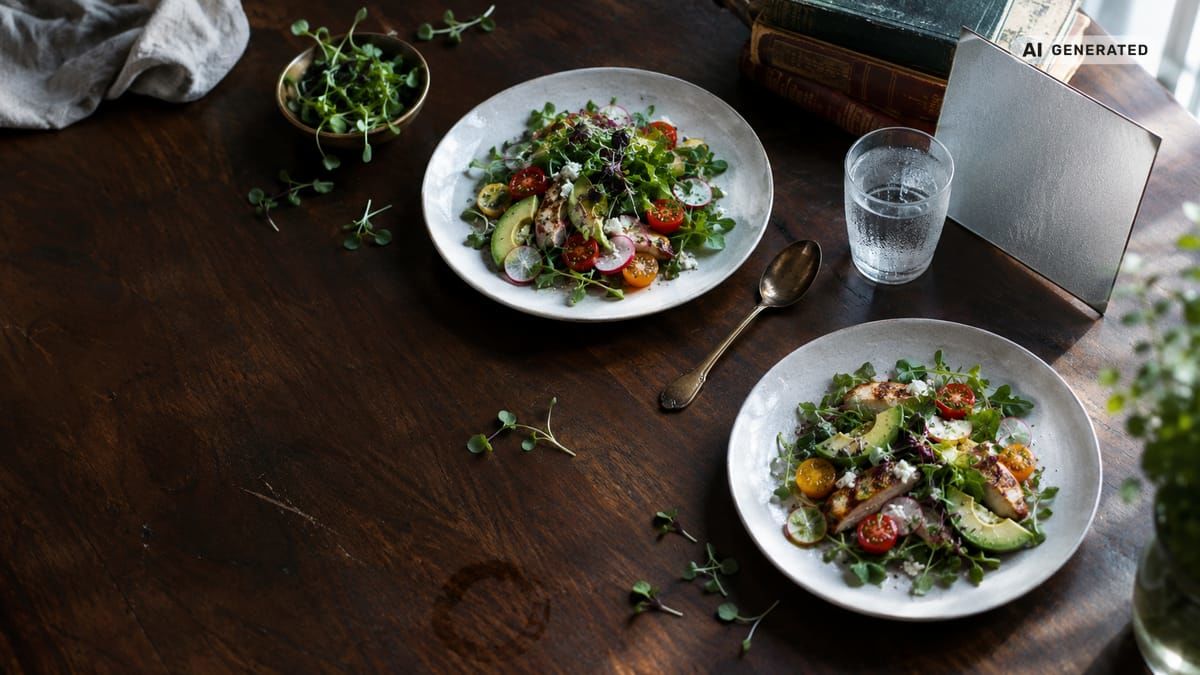
Food photography checklist
- Define the image's channel, crop and required aspect ratio.
- Clean the lens and turn off overhead room lights.
- Select fresh ingredients and reserve the best plate as the hero dish.
- Build the background and props before plating hot food.
- Position the key light beside or behind the dish.
- Test 90-degree, 45-degree and eye-level views.
- Lock focus and exposure on the most important food detail.
- Capture wide, medium, close and action variations.
- Correct white balance before adjusting color or texture.
- Compare the final image against the real dish before publishing.
What makes a food photo look professional?
A professional food photo directs attention immediately to the dish. Lighting reveals shape and texture, colors look credible, focus lands on the most appetizing detail, and every visible prop supports the intended story.
Professional does not necessarily mean complex. A clean phone lens, one window and a carefully styled plate can outperform expensive equipment used under mixed lighting. The Adobe food photography guide recommends intentional depth of field, window light and established composition tools such as the rule of thirds. BBC Good Food's guide on how to photograph food similarly emphasizes these fundamentals as the foundation of appetizing imagery.
Made with AvocAIdo
Your product. Your style. Four possibilities.
Turn a product photo and a style reference into studio-style images. Compare AI models in one place.


Saved examples · 4 AI models




Free credits to start · No credit card
How should you plan the food shoot?
Start with the intended use. A delivery-platform image must identify the meal clearly, while social artwork can include hands, ingredients and a broader environment. E-commerce assets may require negative space for a product name, price or other information.
Build the shot in this order:
- Choose the final crop, such as 1:1 for a square post or 9:16 for vertical content.
- Decide what must stay accurate, including portion, ingredients and packaging.
- Arrange the surface, backdrop and empty dish.
- Test light and camera position with a stand-in.
- Add the finished food only when the frame is ready.
- Capture the hero photo before attempting pours, bites or rearrangements.
This approach helps hot food stay fresh and limits unnecessary handling.
How do you style food and select props?
Use fresh, undamaged ingredients because bruising, wilting and drying remain visible after editing. Add sauces and delicate garnishes near the end, and clean drips from areas where they do not serve the composition.
Props should establish context without becoming the subject. Begin with the plate, one supporting textile and one relevant utensil. Add more only when the frame still has clear negative space. Shopify's food photography guidance likewise emphasizes consistency, careful composition and simple equipment.
A cohesive palette may be complementary, tonal or neutral. For example, warm wood can support rustic artwork, while pale stone and limited props can make colorful food feel more modern. Serious Eats' beginner's guide to food photography explores how color, texture and composition work together to make dishes look appealing.
Which lighting setup makes food look appetizing?
Natural side light is the simplest dependable setup. Place the dish beside a window, switch off overhead lights and position a white board opposite the window to soften dark shadows.
Three practical lighting diagrams are:
- Window light: window, dish, white reflector. Rotate the dish until texture catches the light.
- One softbox: softbox at the side, dish in the center, reflector opposite. Keep the light larger and close enough to create soft transitions.
- Backlight: light behind the food, dish in front, camera facing the lit edge. This works well for drinks, translucent ingredients, steam and glossy sauces.
For natural light, a practical camera baseline is ISO 100 to 400 and f/4 to f/8 (zdroj: Furoore). Avoid direct front light when texture is important because it can flatten the dish.

Which camera angle fits each dish?
Camera angle should reveal the dish's defining feature rather than follow one rule for every meal.
| Dish type | Starting angle | Feature emphasized |
|---|---|---|
| Flat pizza, cookies or grazing board | 90 degrees | Shape and arrangement |
| Layered cake, burger or sandwich | 0 to 15 degrees | Height and internal layers |
| Bowl, plated main or pasta | 45 degrees | Contents plus depth |
| Drink or bottle | 0 to 15 degrees | Silhouette and label |
| Tall dessert or stacked pastry | 0 degrees | Vertical structure |
| Detailed ingredient or garnish | Close-up | Texture and finish |
After choosing the angle, activate the camera grid and place the focal detail near a thirds intersection. Take at least 3 framing variations: environmental, full plate and close detail.
What camera and smartphone settings should you use?
For a camera, begin around ISO 100 to 400 and f/4 to f/8 in natural light. Use f/4 when selective focus supports the image, or move toward f/8 when multiple ingredients need clarity. Aim for approximately 1/125 second or faster when shooting handheld.
Professional food photographers can cover many assignments with 35 mm, 50 mm and 100 mm macro lenses. The 35 mm adds environment, the 50 mm offers a natural perspective, and the macro lens captures texture.
On an iPhone or another smartphone, clean the lens, enable the grid, lock focus and exposure, and use RAW capture when the camera app supports it. RAW files provide more flexibility for correcting white balance than compressed images (zdroj: Travel Yourself). For on-the-go post-production, explore the best AI photo editing apps for mobile.
How do you capture steam, pours and melting food?
Prepare the entire composition with a stand-in before introducing time-sensitive food. Keep the final garnish, sauce and drink nearby, then replace the stand-in and take the static hero image first.
For a pour, lock the camera on a tripod and rehearse the path using an empty vessel. For steam, use backlight against a darker area so it remains visible. For ice cream, condensation or browning, organize props and camera settings before the final plate enters the set. Freshness is difficult to reconstruct convincingly, so Light Stalking recommends prioritizing fresh food and timely capture.
How should you edit food photos?
Correct white balance first so whites, greens and warm ingredients remain believable. Next adjust exposure and contrast, recover distracting highlights, and use selective masks to refine the dish without changing the entire frame.
Sharpen texture carefully and avoid aggressive saturation. Compare the edited file with the real product, especially when the image will stay on a menu or e-commerce platform. Save one high-resolution master, then export separate crops for each channel.
A useful editing order is:
- Lens and perspective correction
- White balance
- Exposure and contrast
- Selective color and texture
- Distraction removal
- Crop, resize and output sharpening
For a detailed walkthrough of each step, follow this step-by-step guide to editing photos with AI.
How can AI enhance food photography responsibly?
An AI food photography generator can create conceptual images from a written description, while an AI enhancer begins with a real photo. Use the distinction to determine whether visual accuracy is mandatory.
For menu images, safe AI edits include removing background clutter, extending an empty tabletop, adapting a crop or correcting a localized exposure problem. Do not generate extra ingredients, increase the portion or change the dish's structure when customers rely on the image to make an eating decision. To make your AI-enhanced photos look professional and on-brand, keep every edit traceable to the original dish.
For campaigns, fully generated visuals can be appropriate when clearly treated as illustrative artwork. Keep the brief specific: name the dish, camera angle, light direction, surface, palette, props, aspect ratio and required negative space.
Which food photography hacks prevent common mistakes?
Turn off room lights before using window light because mixed color temperatures make correction difficult. Clean the lens before every phone session, reduce props when the food lacks a clear focal point, and use a reflector instead of flattening shadows with direct flash.
Other frequent mistakes include selecting an angle that hides the dish's defining layers, focusing on the plate rim, editing every image differently and cropping without considering app interfaces. Create one repeatable setup, then document the light position, angle, backdrop and color treatment for the next meal or product. An AI-ready brand style guide helps keep that documentation consistent across shoots and team members.

AvocAIdo tip
For a repeatable food-brand workflow, AvocAIdo lets users establish a visual style from reference photos and generate through Grok Imagine, Seedream 5 Lite, NanoBanana 2 and GPT Image 2 in parallel. Its Brand Style Intelligence is designed to apply the reference look across different subjects, while ArtDirector AI converts plain-language directions into optimized prompts.
This makes it useful for exploring campaign concepts, coordinated backgrounds and channel-specific visual assets. Available aspect ratios include 1:1, 16:9, 9:16, 3:4 and 3:2. Review AvocAIdo's pricing plans to find the tier that fits your volume.
Frequently asked questions
Can I take professional food photos with a phone?
Yes. Start with one clean lens, window light and the camera grid, then lock focus and exposure on the food's key detail. Capture at least 3 versions at different distances and use RAW mode when supported, since it provides greater flexibility for white-balance and exposure correction.
What is the best angle for photographing a meal?
Begin at 45 degrees for most plated meals and bowls because it shows both the surface and depth. Use 90 degrees for flat foods such as pizza, and move toward 0 degrees for burgers, drinks and tall desserts where height or layers matter most.
What settings should I use in natural light?
A practical starting point is ISO 100 to 400, aperture f/4 to f/8 and approximately 1/125 second or faster when shooting handheld. Review sharpness after the first frame, then adjust ISO or use a tripod instead of accepting motion blur.
Should I use FoodShot AI or an AI generator?
First determine whether the tool enhances an uploaded photograph or creates a new image from text. For a real menu item, preserve the dish and limit AI to corrections such as background cleanup or crop extension. For conceptual artwork, a generator can create new scenes, but review at least 4 outputs for ingredient and structural errors. To choose the right AI editing tool for your needs, compare feature sets against your specific use case.
How do I make AI food pictures look realistic?
Describe at least 6 elements: the food, plate, angle, light direction, background and intended crop. Add physical details such as crumbs, sauce texture or condensation, then inspect hands, utensils, labels and repeated ingredients before using the image in public marketing.
How can restaurants keep food images consistent?
Create a reference set showing one approved light direction, palette, background and editing treatment. Apply those decisions to every shoot, capture the same 3 framing distances, and store export settings for each channel. A style-reference workflow can also help coordinate generated campaign assets with existing photography. Professional teams may also benefit from AI photo editing apps built for professionals to streamline this process.
Next step
Select 3 approved food images that best represent your brand's lighting, palette and composition. Upload them to AvocAIdo's free trial to explore related visual directions across 4 parallel AI models. The trial includes 4,000 credits and does not require a credit card.
Zdroje
Ready to create your own images?
Bring a brief or a reference image. Explore the possibilities with four AI models.
Free credits to start · No credit card